Stay updated with your Online Sui Gas bill details. Download PDF of your Gas
bill with our fast, mobile-friendly portal, made to view, print or pay your
previous/current month SSGC duplicate bill payment easily using your
10-digit Customer Number.
Wait 10-15 seconds after click on button
Loading your Gas Bill Tool checker…
5
Please wait while we prepare your bill tool
Lost or misplaced your Sui gas bill? No need to visit any office to get a bill copy. You can get your SSGC duplicate bill online in seconds, anytime, from anywhere in Pakistan.
Sui Southern Gas Company (SSGC) provides an user-friendly online portal where residential and commercial consumers can check, view, and download their current/previous month's bill using just their 10 digit consumer number. Whether you need it for record-keeping, payment, or a landlord dispute, your SSGC e-bill is always one click away.
How to check & download SSGC Duplicate Bill Online?
You can easily view gas bills from SSGCDuplicateBills without login or register. The process is really simple. All you need is your SSGC consumer number and you are good to go.
Where Can I Find My SSGC Customer Number?
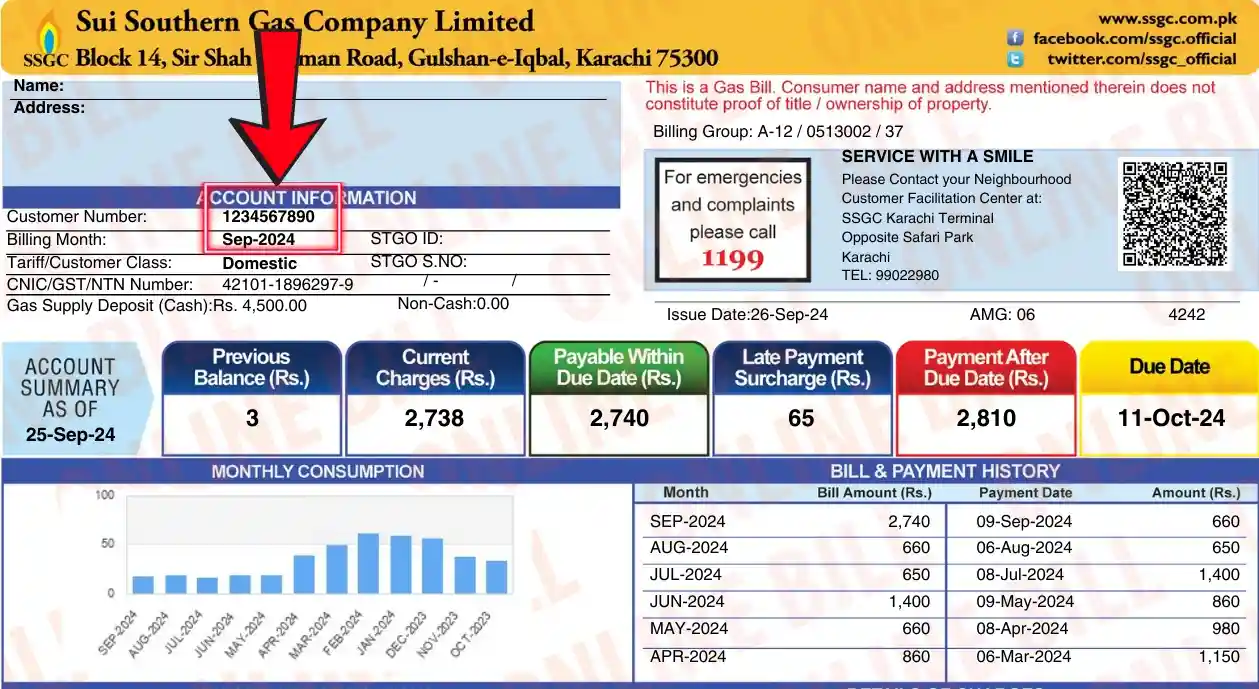
Your SSGC customer number is a unique 10 digit identification code aligned to every gas meter. It is also printed on your original sui gas bill, usually at the top right corner under the label "Consumer No." and typically begins with digits like 30 or 31.
If you do not have your old bill, there are a few other ways to find it. You can check your tenancy or property agreement, ask your landlord or property owner, or visit your nearest SSGC regional office in person with your original ID card. You can also call SSGC customer support and they will help you retrieve your consumer number after identity verification.
In the image below, you can see the Customer Number location in your Sui gas bill.
Step-by-Step
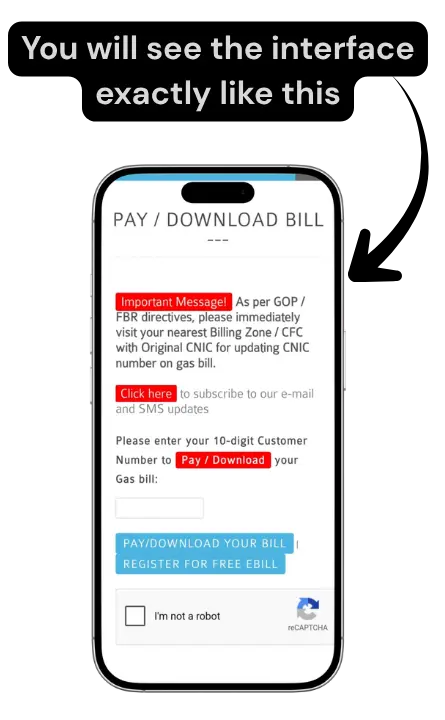
Step 1
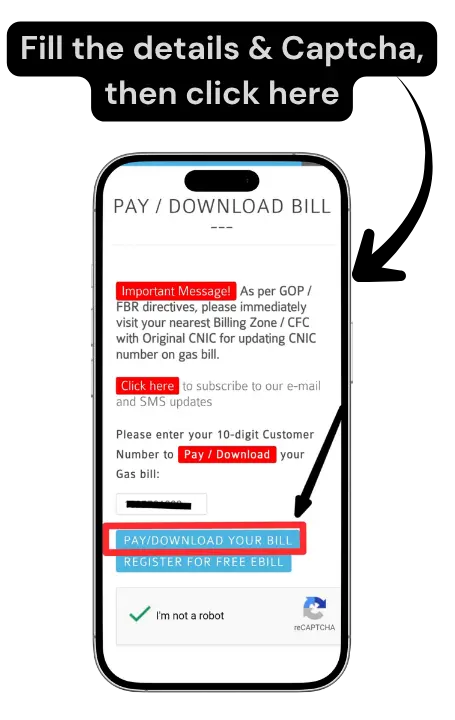
Type your 10 digit SSGC consumer number in the tool above and press the "Pay/Download your Bill" button. Make sure there are no spaces or extra digits entered.
Step 2
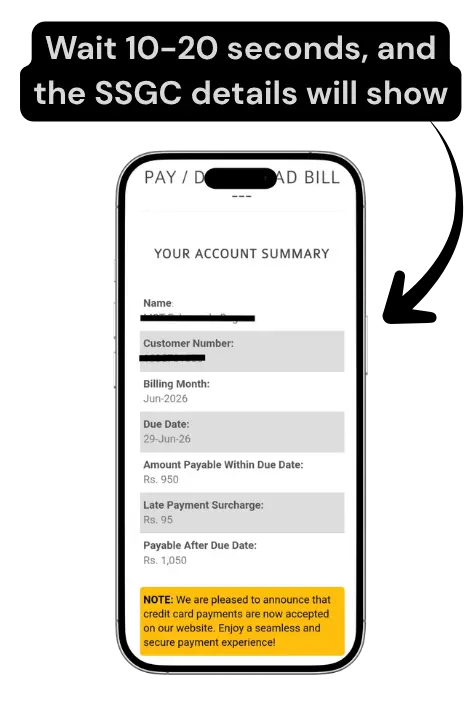
Now please wait 10-20 seconds to view your bill details. After this, your gas bill will be able to see all the important details including the billing month, bill issue date, due date, total amount payable, units consumed, and any outstanding arrears from previous months.
Step 3
Click on "Download or Print your Bill PDF". Save your SSGC duplicate bill as a PDF file on your mobile/PC. You can also print it directly.
Step 1
Step 2
Step 3
What to Check After the Bill Opens?
Remember, it always takes 10-20 seconds to show the details after clicking on button. When your SSGC bill opens. Here is what you should look at:
Due Date:
Always check the due date first. Paying after the due date will result in a late payment fine being added to your next month bill.
Arrears:
If you have any remaining amount of previous months, you've not paid, it will be shown separately as arrears on top of your current bill.
Units Consumed:
Must cross check the units shown on your bill with your actual meter reading. If there is a big difference, you may need to file a complaint with SSGC.
PUG and GSD:
PUG refers to "Pressure Upgrade Gas" charges and GSD stands for "General Security Deposit". These are additional line items on your bill. (Optional to check)
How to Pay Your SSGC Gas Bill?
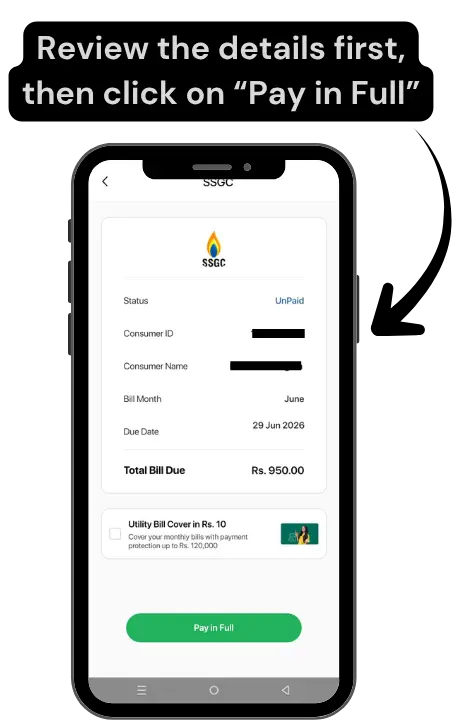
Once you have checked your SSGC duplicate bill online, paying it is just as easy. SSGC offers multiple payment methods so you can choose whichever is most convenient for you. You have both online and offline options.
Pay Online via Mobile Apps and Wallets
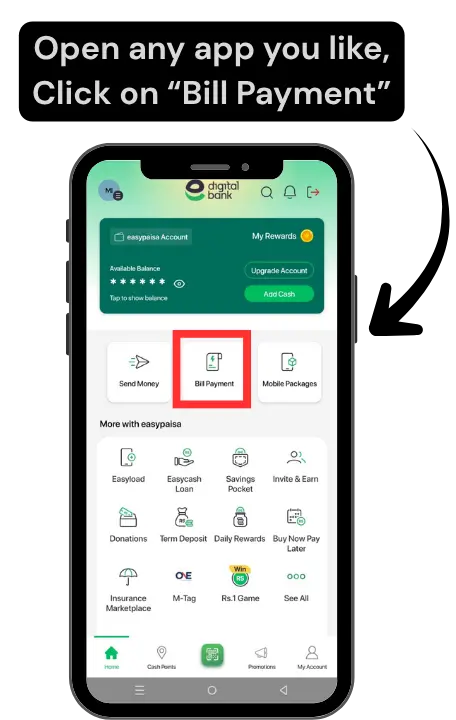
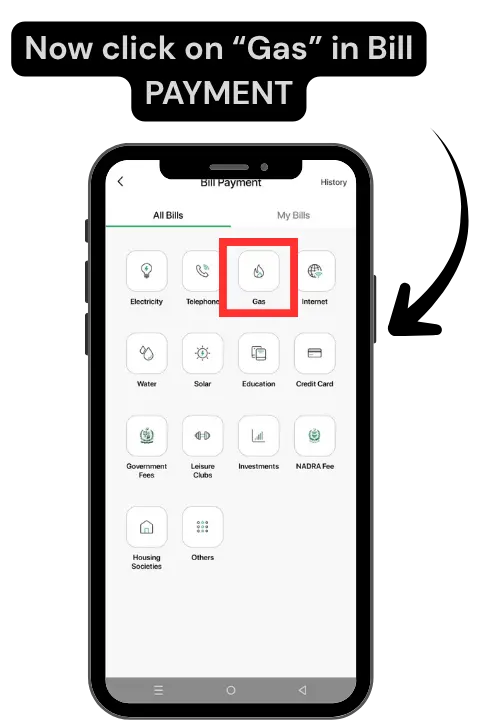
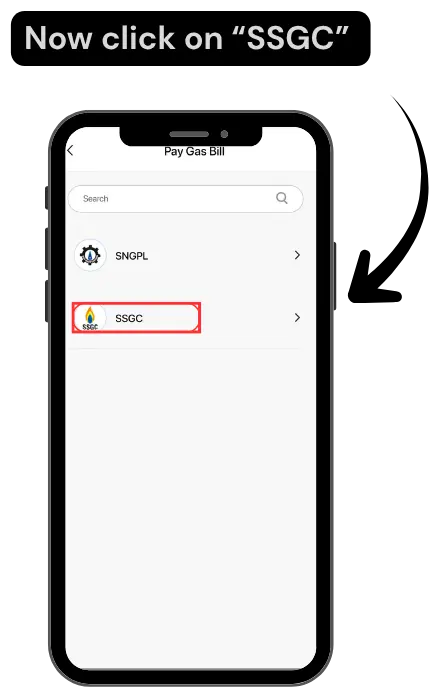
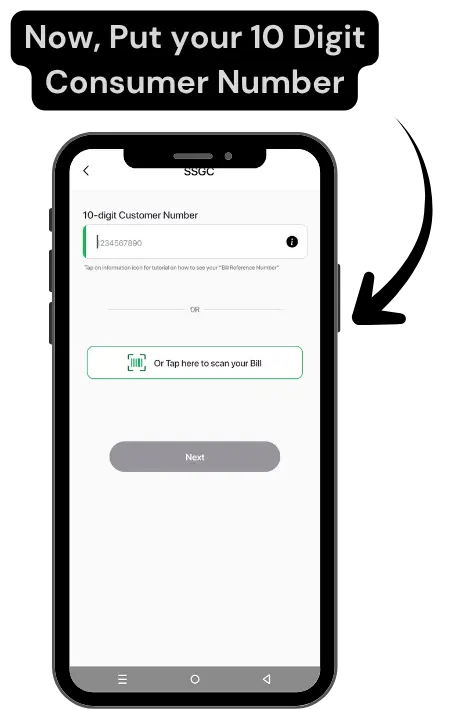
You can pay your SSGC gas bill online using popular mobile banking apps and digital wallets available in Pakistan. Apps like JazzCash, Easypaisa, HBL Mobile app, Meezan Bank App, UBL Digital, and Bank Alfalah (ALFA app) all support SSGC bill payments. Simply open your app, go to the bill payments section, select Sui Southern Gas Company or SSGC, enter your customer number, verify the amount, and confirm the payment. You will receive a confirmation receipt on your phone instantly as a payment proof.
Pay via SSGC Customer Connect Mobile App
SSGC Customer Connect is an official application developed by SSGC. Through this app you can check your current and previous gas bills, make payments directly, register complaints, track your complaint status, and even apply for new gas connections. To pay your bill through the Official App, download SSGC Customer Connect from the Play Store or App Store, register with your customer number, and follow the payment steps inside the app.
Pay Bill Offline via ATM or Nearest Bank
If you do not have access to mobile banking or internet errors, you can pay your SSGC gas bill through ATMs or by visiting a nearest bank like HBL, UBL, MCB, Allied Bank, and Bank Alfalah, which accepts gas bill payments. You can also use your ATM or debit card at any 1-Link ATM, select the bill payment option, choose SSGC, enter your account number, and complete the transaction.
Step 1
Step 2
Step 3
Step 4
Step 5
SSGC Gas Load Shedding Schedule
SSGC manages gas supply across its entire distribution network on a rotational load management basis across residential, commercial, and industrial areas.
Morning, Afternoon and Evening Time Slots
The schedule varies depending on the city, area, and season, and is subject to change based on overall gas availability and government directives.
Based on the current load management plan, gas supply in most residential areas of Karachi follows three daily time slots:
Time Slot
Supply Hours
Morning
6:30 AM to 8:30 AM
Afternoon
12:00 AM to 3:00 PM
Evening
6:00 PM to 9:00 PM
For customers in Quetta and other parts of Balochistan, SSGC has announced a separate schedule than Karachi during summer months where gas supply remains available from 5:00 AM to 10:00 PM daily, with supply suspended between 10:00 PM and 5:00 AM overnight.
It is important to note that actual gas availability can vary from area to area even within the same city. Different areas may also have different gas supply timings, such as parts of Orangi Town, Malir, Landhi, and North Nazimabad, may experience lower pressure compared to centrally located areas. Also for cities, Consumers in Karachi, Hyderabad, Sukkur, and Quetta may experience different schedules depending on local demand.
Please note that timings are revised periodically by SSGC based on seasonal demand, gas shortfall, and government policies. For the most accurate and updated schedule for your specific area, you can follow the SSGC official social media channels, or call the SSGC helpline at 1199.
SSGC Bill Alerts, Email and SMS
How to Get SSGC Duplicate Bill via Email and SMS Alerts
SSGC allows consumers to receive their gas bill directly via email or SMS. Instead of manually checking your SSGC duplicate bill every month. First do register, then you will get a notification and a direct link to your e-bill. It will save time and ensure you never miss a payment due date.
How to Subscribe for SSGC Bill Alerts?
To subscribe for SSGC bill alerts, visit the official SSGC website and go to the e-bill registration section. Enter your 10-digits customer number, your email address, and your registered mobile number. Once submitted, SSGC will start sending you bill notifications every month. You can also register through their official mobile app by updating your profile with your contact details.
About SSGC
Sui Southern Gas Company (SSGC) is one of Pakistan's largest public utility companies, responsible for the distribution of natural gas across Sindh and Balochistan. The company serves millions of residential, commercial, and industrial consumers and plays a great role in meeting the everyday gas needs of households across the region.
SSGC Service Areas and Cities
SSGC provides gas supply to major service areas including Karachi, Hyderabad, Sukkur, Larkana, Nawabshah, Mirpurkhas, Quetta, Turbat, Khuzdar, and several other districts in Sindh and Balochistan. It is important to note that cities like Lahore, Faisalabad, Sialkot, and Peshawar fall under SNGPL (Sui Northern Gas Pipelines Limited).
SSGC Regional Office Locations
SSGC has regional offices across its service areas to assist consumers with billing issues, new connection, complaints, and other services. Key regional offices are located in Karachi, Hyderabad, Sukkur, and Quetta. Consumers can visit their nearest regional office during 9AM - 5PM from Monday to Friday for any gas related queries or complaints.
SSGC Head Office Karachi
The SSGC head office is also located in Karachi at SSGC House, Sir Shah Suleman Road, Gulshan-e-Iqbal, Karachi. This is the central administrative office of the company where major operations and decisions are managed.
SSGC Regional Office Hyderabad
The SSGC Regional Office Hyderabad is located opposite New Eidgah, National Highway, Phase 1 Qasimabad, Hyderabad, Sindh. This office serves as the regional headquarters for Hyderabad and manages gas supply, distribution, meter issues, billing, and consumer complaints for all over Hyderabad.
Contact SSGC
If you have a gas leakage or any problem related to Sui gas, you can contact through any of the options given below.
SSGC Emergency Helpline 1199
For any gas leakage, pipeline emergency, or urgent gas related issue, call SSGC emergency helpline 1199 immediately. This helpline is available 24 hours a day, 7 days a week across all SSGC service areas.
SSGC WhatsApp Number
SSGC also offers customer support via WhatsApp. You can send queries, complaints, or bill related questions directly to the official SSGC WhatsApp number at 0330-3999179. This service makes it easier for customers to get help without visiting an office.
SSGC Complaint Email Address
For non-urgent complaints, billing disputes, or service requests, consumers can reach SSGC via email at info@ssgc.com.pk. Make sure to include your customer number and a clear explanation of your issue for a faster response.
FAQs
If your bill is not appearing, please make sure that you have entered the correct 10 digit customer number. If the problem persists, your bill may not have been generated yet for the current month or there may be a bug with the SSGC portal.
Provisional billing only happens when the SSGC meter reader is unable to access your property to record the live meter reading. In this matter, SSGC estimates your bill based on your past history.
PUG stands for Pressure Upgrade Gas charges. These are additional charges applied to certain users as part of SSGC infrastructure improvement and gas pressure upgrade projects in their area.
GSD stands for General Security Deposit. It is a refundable amount that SSGC collects from customers as a security against the gas connection. You can ask to get a refund from the Official website.
If you smell gas or feel a leak, immediately turn off the main gas valve, please avoid using any electrical switches or open flames, ventilate the area, and call SSGC emergency helpline 1199 immediately. Please do not attempt to fix a gas leak yourself.
You can register a billing complaint by calling 1199, emailing info@ssgc.com.pk, or visiting your nearest SSGC regional office. For installment requests on large outstanding amounts, visit the regional office in person with your gas bill and CNIC.
To restore gas supply after disconnection due to non-payment, clear all remaining dues first including any surcharges and reconnection fees. Submit your payment proof at the nearest SSGC office and request reconnection. The process typically takes a few business days.
No, SSGC provides piped natural gas only. For LPG cylinders, contact PSO or HASCOL dealers.